> ## Documentation Index
> Fetch the complete documentation index at: https://docs.embeddables.com/llms.txt
> Use this file to discover all available pages before exploring further.

# Embed in a React app

> How to publish your Embeddable inside a React app

Embedding your Embeddable in a React app is straightforward, and looks similar to the process of embedding in a regular website.

<Tip>
  Looking for other ways to publish your Embeddable? Check out the [Publish to your site](/features/publish-to-your-site) guide.
</Tip>

## Embedding in React

<Steps>
  <Step title="Grab the embed code">
    Head to the Embeddable in the [Web App](https://app.embeddables.com/), click **Embed Code** in the top-right corner,
    and you'll see the two-part embed code in the pop-up modal.
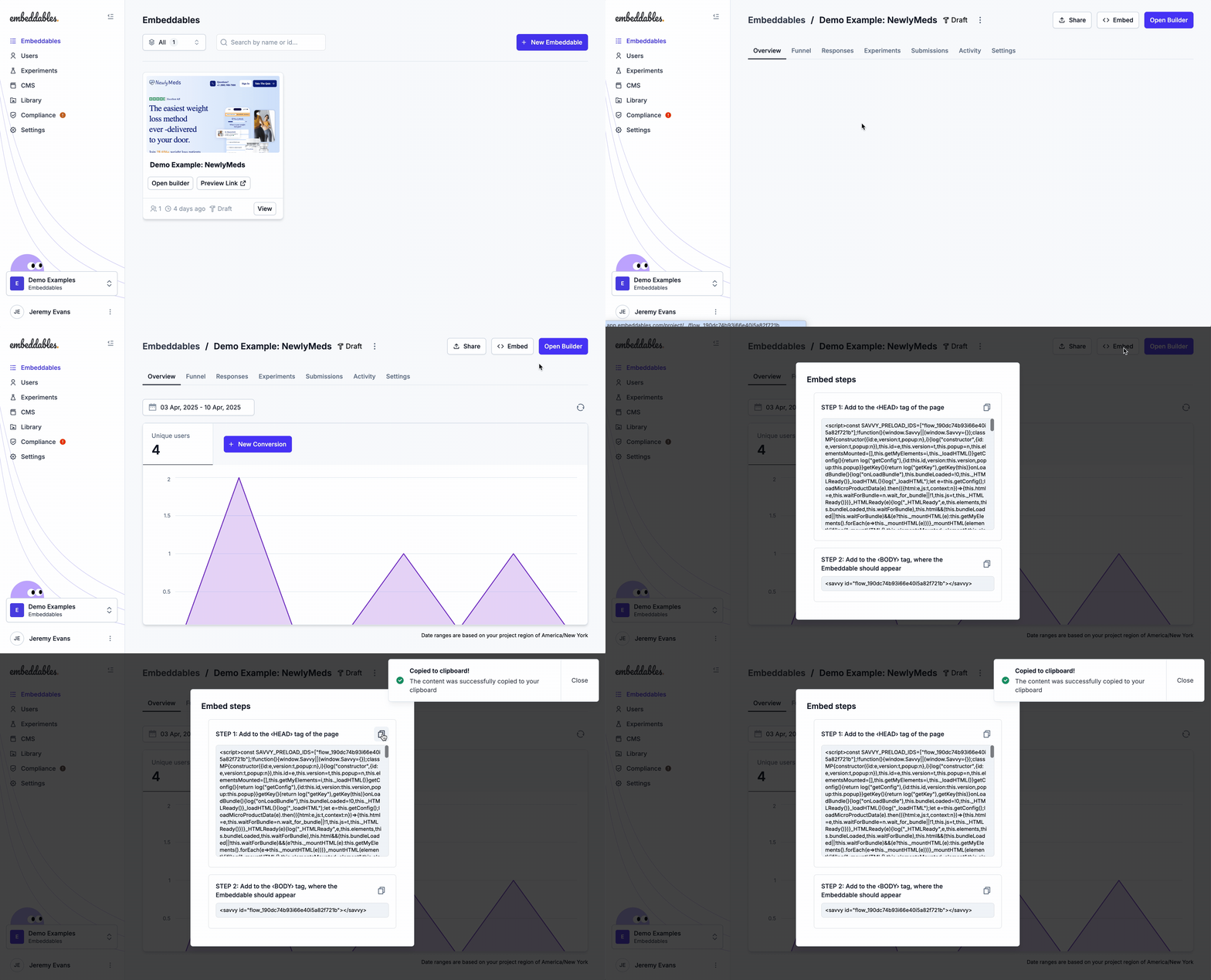
    <Frame>
      <img src="https://assets.embeddables.com/2025-04-1011_18708467466947587.12.05.gif" />
    </Frame>
  </Step>

  <Step title="Insert the first part in the Head">
    The first part of the embed code (the large part) should go in the `<HEAD>` of the page.

    **This only needs to be added once** - if it's already installed on all pages of your site then you can skip this step.

    This is the large part that starts like this:

    ```html Embed Code - Part 1/2 theme={null}
    <script> const SAVVY_PRELOAD_IDS=...
    ```
  </Step>

  <Step title="Insert the second part in the Body">
    The second part of the embed code should go in the `<BODY>` of the page, wherever you want the Embeddable to appear on the page.

    The is the part that looks like this (where `flow_abcdefhijklm` is your Embeddable ID):

    ```html Embed Code - Part 2/2 theme={null}
    <savvy id="flow_abcdefhijklm"></savvy>
    ```
  </Step>
</Steps>

## Embedding in a website or native app?

<CardGroup cols={2}>
  <Card title="Embed in your site" icon="code" href="/how-to/embed-in-your-site">
    How to publish your Embeddable to your site
  </Card>

  <Card title="Embed in a Webflow site" icon="webflow" href="/how-to/embed-in-your-webflow-site">
    How to publish your Embeddable to your Webflow site
  </Card>

  <Card title="Embed in a WordPress site" icon="wordpress" href="/how-to/embed-in-your-wordpress-site">
    How to publish your Embeddable to your WordPress site
  </Card>

  <Card title="Embed in a Framer site" icon="framer" href="/how-to/embed-in-your-framer-site">
    How to publish your Embeddable to your Framer site
  </Card>

  <Card title="Embed in a React Native app" icon="mobile-screen-button" href="/how-to/embed-in-react-native">
    How to publish your Embeddable inside a React Native app
  </Card>
</CardGroup>

## Troubleshooting

### React is giving me a warning about an unrecognized `<savvy>` tag

Sometimes in the console, you will see this warning log from React:

```mdx Console theme={null}
Warning: The tag <savvy> is unrecognized in this browser.
If you meant to render a React component, start its name with an
uppercase letter.
```

This warning can be safely ignored, and should have no impact on your app.

However, if you want to avoid the warning appearing in the console, a workaround is to
insert the savvy just after the initial render using React's `useEffect` hook:

```javascript App.js theme={null}
useEffect(() => {
  const htmlElement = `<savvy id="flow_abcdefhijklm"></savvy>`;
  const container = document.getElementById("my-container"); // Select the container that the Embeddable should appear in
  container.innerHTML = htmlElement; // Use '+=' if you want to append the Embeddable to the contents of the container, instead of replacing the contents
});
```

<Note>Typescript samples will be added to this page soon</Note>
